
AI Infrastructure Agent for AWS
Transform your AWS infrastructure management with natural language commands! This guide will walk you through everything you need to know to start using the AI Infrastructure Agent effectively.

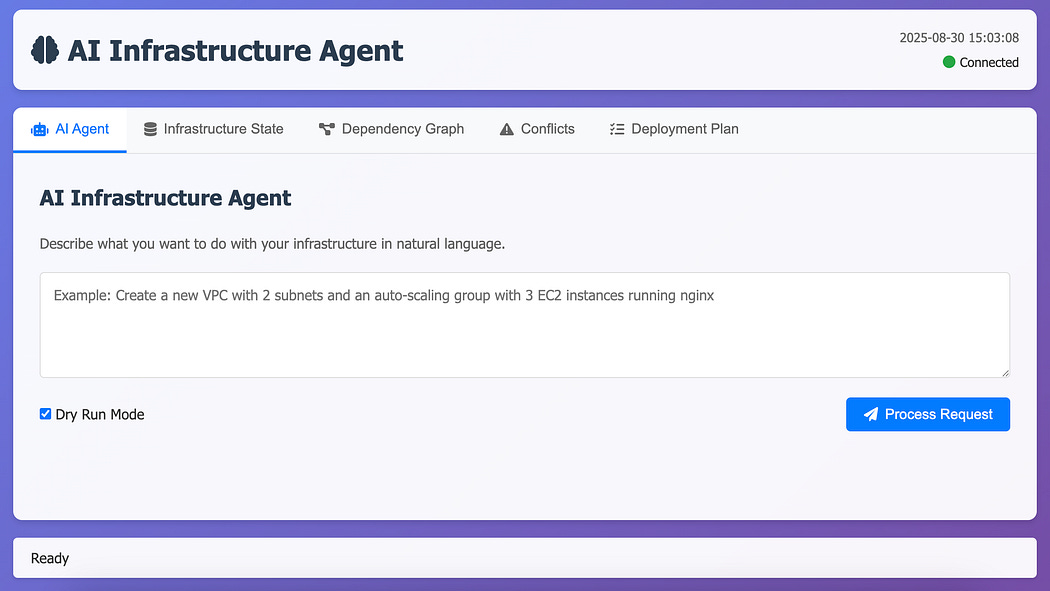
Note: This is a Proof of Concept Project.
What You’ll Learn
How to set up and configure the AI Infrastructure Agent
Step-by-step walkthrough of creating infrastructure with natural language
Best practices for safe infrastructure management
Advanced usage patterns and tips
Step 1: Installation & Setup
Visit AI Infrastructure Agent (don’t forget to give a star for the repo 😊).
Installation:
# Clone the repository
git clone https://github.com/VersusControl/ai-infrastructure-agent.git
cd ai-infrastructure-agent

# Run the automated installation script
./scripts/install.sh
The installation script will handle everything for you:
Install Go dependencies
Build the applications
Create necessary directories
Set up configuration files
Configure Your Environment
Set up your AI provider API key:
# For OpenAI (recommended for beginners)
export OPENAI_API_KEY="your-openai-api-key-here"

# For Google Gemini
export GEMINI_API_KEY="your-gemini-api-key-here"

# For Anthropic Claude
export ANTHROPIC_API_KEY="your-anthropic-api-key-here"
Configure AWS credentials:
# Method 1: Using AWS CLI (recommended)
aws configure

# Method 2: Environment variables
export AWS_ACCESS_KEY_ID="your-access-key"
export AWS_SECRET_ACCESS_KEY="your-secret-key"
export AWS_DEFAULT_REGION="us-west-2"
Edit configuration file:
nano config.yamlUpdate the configuration to match your preferences:
agent:
  provider: "openai"          # Your chosen AI provider
  model: "gpt-4"             # AI model to use
  dry_run: true              # Start with dry-run for safety
  auto_resolve_conflicts: false

aws:
  region: "us-west-2"        # Your preferred AWS region
  profile: "default"

web:
  port: 8080                 # Web dashboard port
Step 2: Launch the Web Dashboard
Start the web interface:
./scripts/run-web-ui.shOpen your browser and navigate to http://localhost:8080.
The dashboard provides:
Natural language input for infrastructure requests
Visual execution plans before any changes
Real-time monitoring of infrastructure operations
State management and conflict detection
Step 3: Your First Infrastructure Request
Let’s create a simple web server infrastructure with a practical example. In the web dashboard, enter this natural language request:
“Create an EC2 instance for hosting an Apache Server with a dedicated security group that allows inbound HTTP (port 80) and SSH (port 22) traffic.”
What Happens
1. AI Analysis & Planning
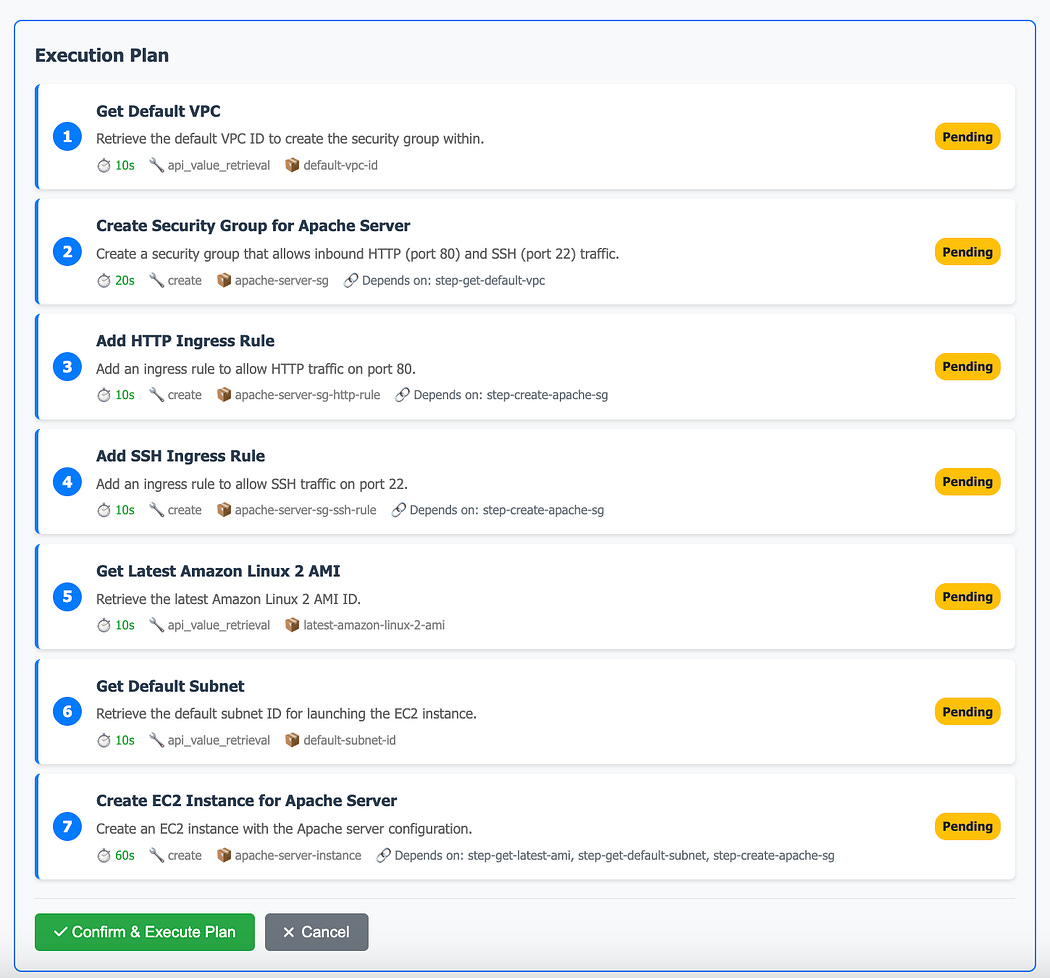
The AI agent will:
Parse your natural language request
Identify required AWS resources
Generate a detailed execution plan
Show dependencies between resources
Review the plan carefully and click “Approve & Execute” when ready.
2. Execution & Monitoring
The system presents a detailed execution plan:
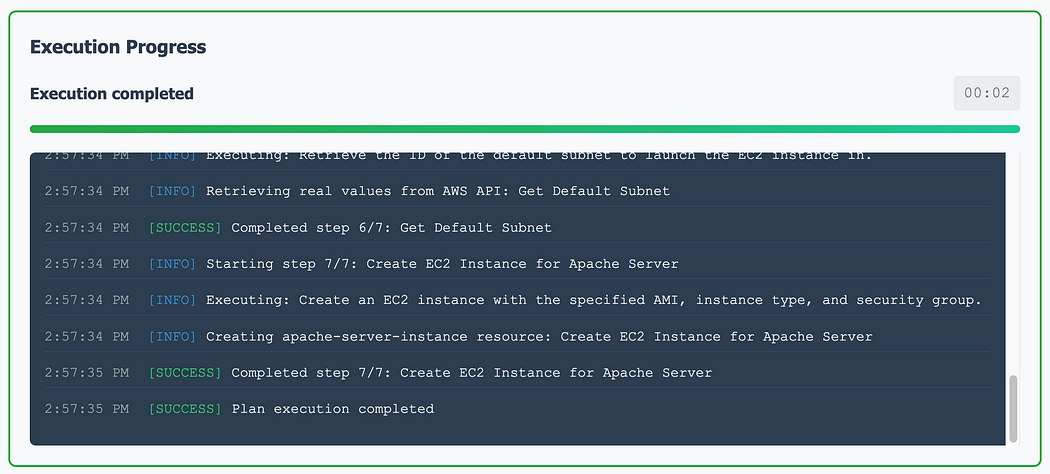
Watch as the agent:
Executes steps in the correct order
Handles dependencies automatically
Provides real-time progress updates
Report any issues immediately
3. Infrastructure State Tracking
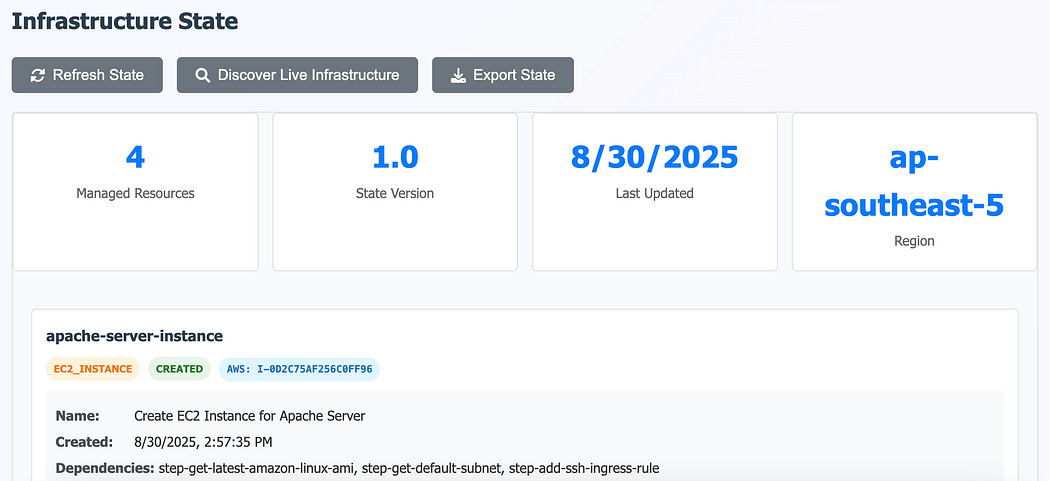
The agent maintains a complete state of your infrastructure: resource inventory with relationships.
Advanced Usage Patterns
Try more complex infrastructure requests:
# Load-balanced web application
"Deploy a load-balanced web application with 2 EC2 instances behind an ALB in different availability zones"

# Complete development environment
"Set up a development environment with VPC, public and private subnets, NAT gateway, EC2 instances, and RDS MySQL database"

# Auto-scaling setup
"Create an auto-scaling group with 2-10 instances that scales based on CPU utilization above 70%"

# Secure environment
"Create a secure 3-tier architecture with web servers in public subnets, app servers in private subnets, and database in isolated subnets"
Tips for Success
Start Small
Begin with simple requests like single EC2 instances
Gradually work up to complex multi-tier architectures
Always use dry-run mode initially
Be Specific
Include details like instance types, regions, and configurations
Specify security requirements clearly
Mention any compliance or performance requirements
Review Everything
Always review execution plans before approval
Check cost estimates against your budget
Verify security group rules match your requirements
Learn from History
Review past executions in the dashboard
Learn from the agent’s decision-making process
Build a library of successful request patterns
Next Steps
Now that you’re up and running:
Experiment with different types of infrastructure requests
Join the community discussions on GitHub
Contribute improvements and bug fixes
Share your successful patterns with others
Stay updated with new features and improvements
Issues: Report bugs and request features on GitHub Issues